cait.versatile preview (experimental)
In this notebook, we present some of the upcoming functionalities of cait. Do not yet use those functions in production as they are subject to change. As of now, they are just presented to give a first taste for what’s coming and to let you play around with it already (and maybe give feedback about possible problems you run into).
import cait as ai
import cait.versatile as vai
import numpy as np

# We use the hdf5 file as created in the previous tutorial
dh = ai.DataHandler(channels=[0,1])
dh.set_filepath(path_h5='../testdata', fname='mock_001', appendix=False)

# We also copy it for later use
import shutil # just used to create a quick copy of our already existing mock data file
import os     # just used to create a quick copy of our already existing mock data file

shutil.copy(dh.get_filepath(), os.path.join(dh.get_filedirectory(),'to_merge1.h5'))
shutil.copy(dh.get_filepath(), os.path.join(dh.get_filedirectory(),'to_merge2.h5'))
DataHandler Instance created.
'../testdata/to_merge2.h5'
Combining/Merging HDF5 files for simultaneous analysis
The HDF5 library introduced virtual datasets which is now also exploited in cait to easily combine files and analyse them together. A new HDF5 file will be created but its contents are merely links to the already existing ‘source files’. Once they are combined, you can load the new HDF5 file like any other file and start analysis. Note that since the data is still stored in the original files, you may not move/delete them.
If you wish to actually merge the files (and copy all the data into a single file) you can do so using the merge function.
vai.file.combine(fname="merged_file",                   # output name
                 files=["to_merge1", "to_merge2"],      # files to merge/combine
                 src_dir="../testdata",                 # folder for input files
                 out_dir="../testdata",                 # folder for output file
                 groups_combine=["testpulses","noise"], # the groups in the HDF5 file you want to combine
                                                        # (have to be present in ALL source files)
                 groups_include=[])                     # the groups you want to include additionally
                                                        # (have to be present in at least one source file)
Overwriting existing file '../testdata/merged_file.h5'.
Successfully combined files ['to_merge1', 'to_merge2'] into '../testdata/merged_file.h5' (19.6 KiB).
As you can see, the resulting file size is only a few KiB due to no data being copied. We can now create a DataHandler to the combined file and inspect it with our usual methods:
dh_combined = ai.DataHandler(channels=[0,1])
dh_combined.set_filepath(path_h5='../testdata', fname='merged_file', appendix=False)

print(dh_combined)
DataHandler Instance created.
DataHandler linked to HDF5 file '../testdata/merged_file.h5'
HDF5 file size on disk: 30.0 KiB
Groups in file: ['noise', 'testpulses'].

The HDF5 file contains virtual datasets linked to the following files: {'../testdata/to_merge1.h5', '../testdata/to_merge2.h5'}
All of the external sources are currently available.

Time between first and last testpulse: 2.78 h
First testpulse on/at: 2020-10-16 20:22:06+00:00 (UTC)
Last testpulse on/at: 2020-10-16 23:08:36+00:00 (UTC)
dh_combined.content("testpulses")
testpulses
  add_mainpar             (v) (2, 2666, 16)     float64
  |array_max                  (2, 2666)
  |array_min                  (2, 2666)
  |var_first_eight            (2, 2666)
  |mean_first_eight           (2, 2666)
  |var_last_eight             (2, 2666)
  |mean_last_eight            (2, 2666)
  |var                        (2, 2666)
  |mean                       (2, 2666)
  |skewness                   (2, 2666)
  |max_derivative             (2, 2666)
  |ind_max_derivative         (2, 2666)
  |min_derivative             (2, 2666)
  |ind_min_derivative         (2, 2666)
  |max_filtered               (2, 2666)
  |ind_max_filtered           (2, 2666)
  |skewness_filtered_peak     (2, 2666)
  cuts_SEV                (v) (2, 2666)         bool
  dac_output              (v) (2666,)           float64
  event                   (v) (2, 2666, 16384)  float32
  hours                       (2666,)           float32
  mainpar                 (v) (2, 2666, 10)     float64
  |pulse_height               (2, 2666)
  |onset                      (2, 2666)
  |rise_time                  (2, 2666)
  |decay_time                 (2, 2666)
  |slope                      (2, 2666)
  of_ph                   (v) (2, 2666)         float64
  testpulseamplitude      (v) (2666,)           float64
  time_mus                (v) (2666,)           int32
  time_s                  (v) (2666,)           int32
We see that print(dh_combined) tells us which files are linked to the HDF5 file of our DataHandler object. In principle it could happend that some of these source files get deleted. In this case, you could still create the DataHandler but subsequent calculations can have unexpected behaviour. This is why print(dh_combined) also tells you whether all sources are available or not.
Using content now also changed slightly as it shows you an indicator next to datasets which are virtual.
In principle, this is all the difference there is. You can do analysis with dh_combined in the same way you would do with dh. The only thing worth mentioning is that writing to virtual datasets is special. Depending on your use case you could either want to change the data in all source files (which could lead to confusion and unexpected results), or you could want to detach the virtual dataset and write to a regular dataset of that name. In most cases, the latter will probably be the desired behaviour. As a safety feature, the set method checks whether you are attempting to write to a virtual dataset or not and you have to make this decision upon calling it.
To actually merge the files, use cait.versatile.file.merge instead of cait.versatile.file.combine.
Note on continuous time data: The methods described above only stick files together, they do not perform any calculations such as creating a continuous time dataset. Usually, such things can be readily calculated, though. In this example, we could do the following:
timestamp_s = dh_combined.get("testpulses", "time_s")     # second timestamps
microseconds = dh_combined.get("testpulses", "time_mus")  # microsecond timestamps

# Get the earliest timestamp (and set it to 0 hours later. Adjust if you need anything else.)
earliest_ind = np.argmin(timestamp_s)
start_timestamp_s = timestamp_s[earliest_ind]
start_microseconds = microseconds[earliest_ind]

t = ((timestamp_s + microseconds/1e6) - (start_timestamp_s + start_microseconds/1e6) )/3600

dh_combined.set("testpulses", hours=t, write_to_virtual=False)
Successfully written hours with shape (2666,) and dtype 'float32' to group testpulses.
In the last step, we have written the hours dataset into the HDF5 file. Notice that we did not save it to the original files by setting write_to_virtual=False. This new dataset is now really saved in dh_combined.
At some point, a timestamp conversion function like the above will be available in cait.versatile.utils.
Inspecting stream data using cait.versatile.plot.StreamViewer
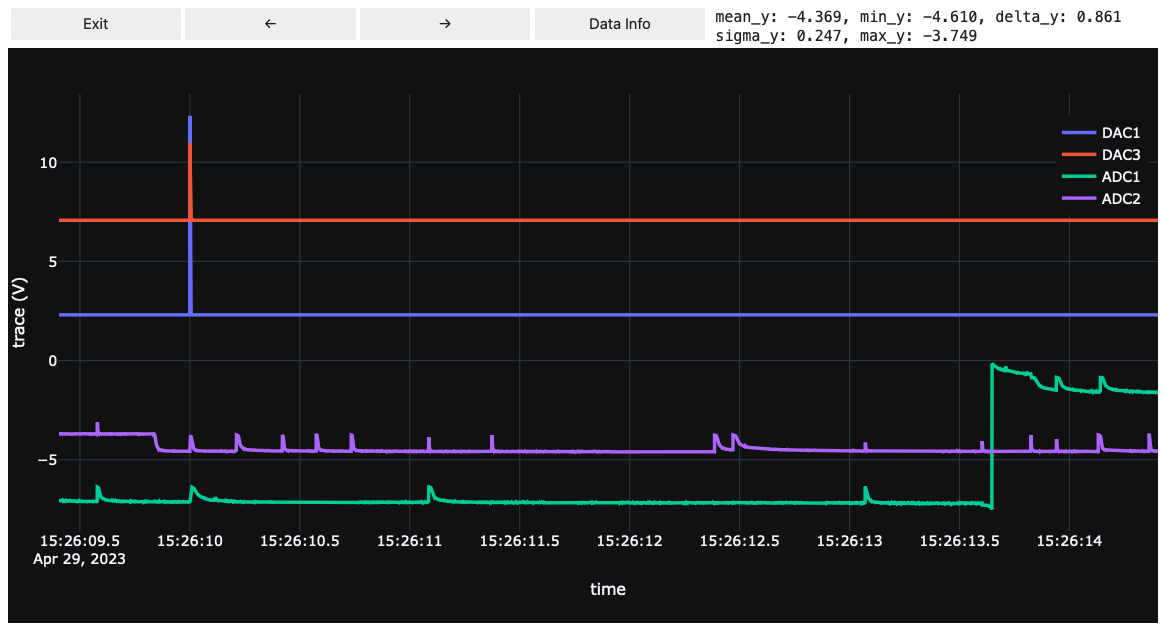
You can load the stream file and use the buttons to navigate backwards/forward in time. Using the Data Info button, you can display useful information about the data on screen. The most helpful ones being the sigma_y (standard deviation of data in y-direction) and delta_y (difference of maximum and minimum of data in y-direction). To calculate those values, the lines that are currently on-screen and visible are considered, i.e. if you want to deduce the baseline noise’s standard deviation, you just have to zoom into a baseline such that nothing else is on screen and hit Data Info.
Note that currently only VDAQ2 stream files are supported
from cait.versatile.plot import StreamViewer

fpath = '/path/to/stream/file.bin'

StreamViewer(hardware="vdaq2", file=fpath, template="plotly_dark", width=1000, downsample_factor=100)
Iterators and cait.versatile.analysis.apply
The idea of iterators is to streamline the application of functions to all events in an HDF5 file. Using
it100 = dh.get_event_iterator(group="events", channel=0, batch_size=100)
it1 = dh.get_event_iterator(group="events", channel=0, batch_size=1)
we can get an iterator object it which iterates over the events of channel 0 in the group ‘events’. It does so with a batch size of 100. In principle, we can set the batch size to 1 but reading data in batches can be significantly faster as it needs less accesses to the HDF5 file on disk.
The best way to use an iterator is within a context, because this way, the HDF5 file is kept open (and the access speed is hence way faster):
# Using context manager
with it1 as it:
    for event in it:
        np.max(event)

# Without context manager (slower)
for event in it:
        np.max(event)
We can also create iterators of only a subset of events using flags:
flag = dh.get("events", "pulse_height", 0) > 5
it_flag = dh.get_event_iterator(group="events", channel=0, flag=flag)
Using the apply function, we can apply a function to all events in such an iterator. The possiblity of multiprocessing is already built-in (notice that locally defined functions can not be used, though. To work around this, just define them in a scrip.py and load them).
output = vai.analysis.apply(np.max, it_flag)
output
array([5.1342773, 5.3463745, 5.9292603, 5.4537964, 5.415039 , 5.373535 ,
       5.8517456, 5.83313  ], dtype=float32)