Plotting
cait.versatile offers often used, out-of-the-box plotting routines.
All of them have a number of keyword-arguments which can be used to
style them. Those keyword arguments are:
backend (str, optional): The backend to use for the plot. Either of
['plotly', 'mpl', 'uniplot', 'auto', i.e. plotly, matplotlib or uniplot (command-line based; has to be installed separately as this is probably not relevant for all users), defaults to'auto'in which case'plotly'is used in notebooks and'uniplot'on the command line (if installed).
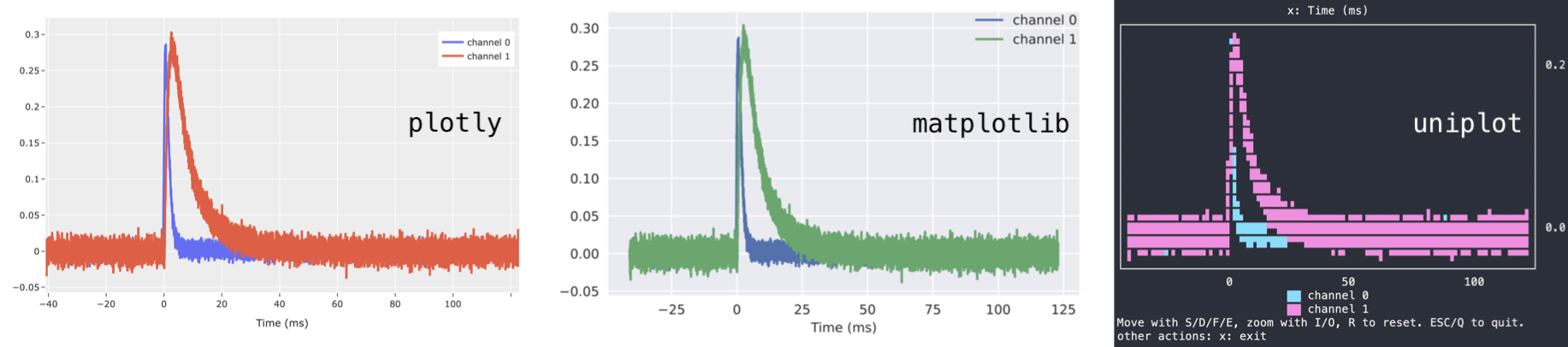
template (str, optional): Valid backend theme. For
plotlyeither of['ggplot2', 'seaborn', 'simple_white', 'plotly', 'plotly_white', 'plotly_dark', 'presentation', 'xgridoff', 'ygridoff', 'gridon', 'none', formpleither of['default', 'classic', 'Solarize_Light2', '_classic_test_patch', '_mpl-gallery', '_mpl-gallery-nogrid', 'bmh', 'classic', 'dark_background', 'fast', 'fivethirtyeight', 'ggplot', 'grayscale', 'seaborn-v0_8', 'seaborn-v0_8-bright', 'seaborn-v0_8-colorblind', 'seaborn-v0_8-dark', 'seaborn-v0_8-dark-palette', 'seaborn-v0_8-darkgrid', 'seaborn-v0_8-deep', 'seaborn-v0_8-muted', 'seaborn-v0_8-notebook', 'seaborn-v0_8-paper', 'seaborn-v0_8-pastel', 'seaborn-v0_8-poster', 'seaborn-v0_8-talk', 'seaborn-v0_8-ticks', 'seaborn-v0_8-white', 'seaborn-v0_8-whitegrid', 'tableau-colorblind10', defaults to'seaborn'forbackend=plotlyand to'seaborn'forbackend=mpl. Note that setting a template for backend'uniplot'has no effect.height (int, optional): Figure height, defaults to 500 for
backend=plotly, 3 forbackend=mpland 17 forbackend=uniplotwidth (int, optional): Figure width, defaults to 700 for
backend=plotly, 5 forbackend=mpland 60 forbackend=uniplotshow_controls (bool): Show button controls to interact with the figure. The available buttons depend on the plotting backend. The default depends on which higher-level plotting routine is used. Available options when
show_controls=Trueare e.g..pngand.pdfdownload of matplotlib figures or the calculation of data means/stds of plotly figures.
Furthermore, they provide functions set_xlabel, set_ylabel, set_xscale, set_yscale, add_line, add_scatter, add_histogram, update_line, update_scatter, update_histogram to change the appareance of plots after they were constructed. See documentation of class Viewer for details.
Basic Plotting Classes
The three basic plotting classes are Line, Scatter, and
Histogram. Their working principle is identical. You can either pass
a list (or numpy.ndarray) to the constructor, or a dictionary whose
keys and values will turn into legend entries and plotted
lines/scatters/histograms. Additionally, you can specify xlabel,
ylabel, xscale, yscale, as well as all the general keyword
arguments described above.
Example:
import cait.versatile as vai

# If x-data is not provided, the index is used for the x-axis.
# If y-data is just an array, it will be plotted as such.
# If y-data is a dictionary, its keys will be used as legend lables and its values are plotted.
# Axis lables and scales can also be provided.

l = vai.Line([1,2,3,3,2,1])
vai.Line({'line1': [1,2,3,3,2,1], 'line2': [2,4,6,5,3,1]})
vai.Scatter([1,2,3,3,2,1], backend="mpl", xlabel="x", template="seaborn")
vai.Scatter([1,2,3,3,2,1], show_controls=True, backend="mpl")

# If bins are not provided, the backend's automatic binning is used
# If bins is an integer, it's the number of bins to use
# If bins is a tuple of the form (start, end, nbins), it is used to do the binning
# The functionality of providing just an array for the data as opposed to
# a dictionary is identical to Line/Scatter

h = vai.Histogram({'hist1': [1,1,1,2,3,4,4,5,6,7,5,3],
               'hist2': [1,1,0,2,3,4,4,0,6,7,5,3]},
            bins = 100,
            ylabel='y')
Higher level Plotting Classes
It is very handy to define the following two classes to inspect data quickly:
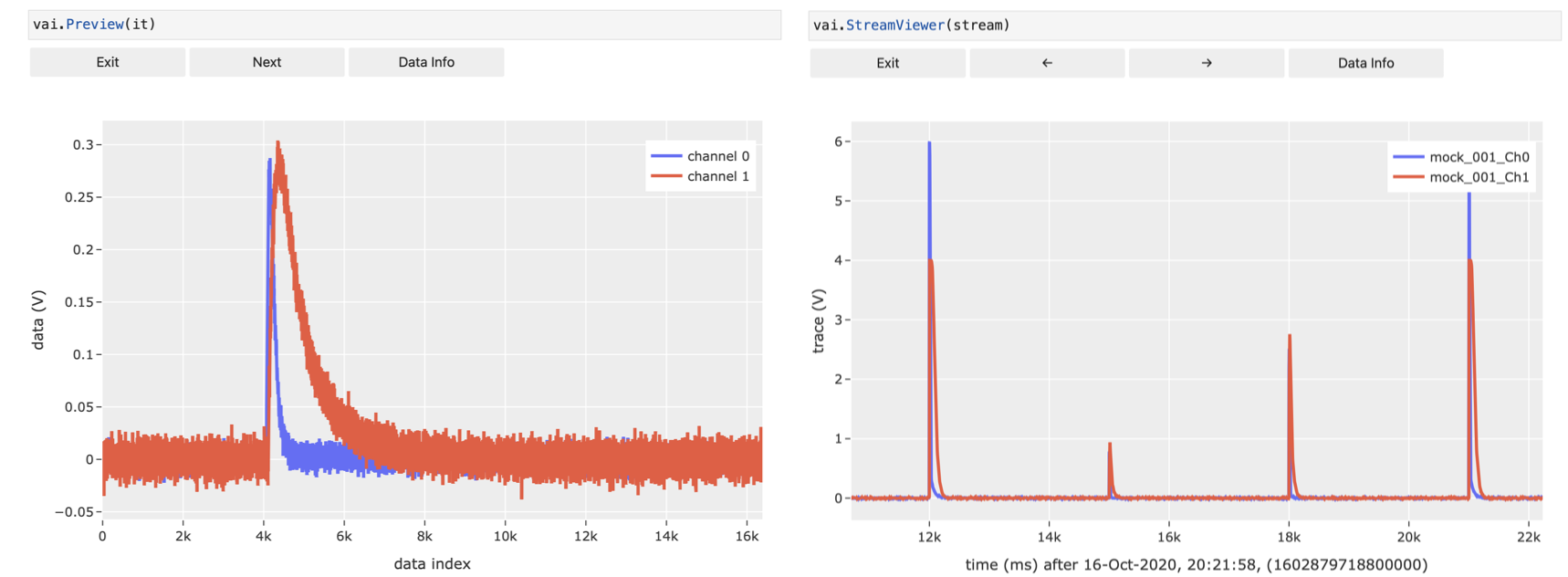
Preview: Inspect events in an event-iterator-object or action of a function on those events.
StreamViewer: View the raw data of a stream file.
Example:
# `cait.versatile` also includes functions, which implement a `preview` method (see below)
# It also implements iterators over events.
# Their interplay can be visualized with `vai.Preview`.
# Alternatively, it can also be used to show just the iterator of events.

# Show just events in iterator
it = dh.get_event_iterator("events")
vai.Preview(it)

# Show effect of removing baseline for events in iterator
it2 = dh.get_event_iterator("events", 0)
vai.Preview(it2, vai.RemoveBaseline())

stream = vai.Stream(hardware="vdaq2", src=fpath)
vai.StreamViewer(stream, template="plotly_dark", width=1000, downsample_factor=100)
It goes without saying that all the keyword arguments for backend, etc. work here as well.
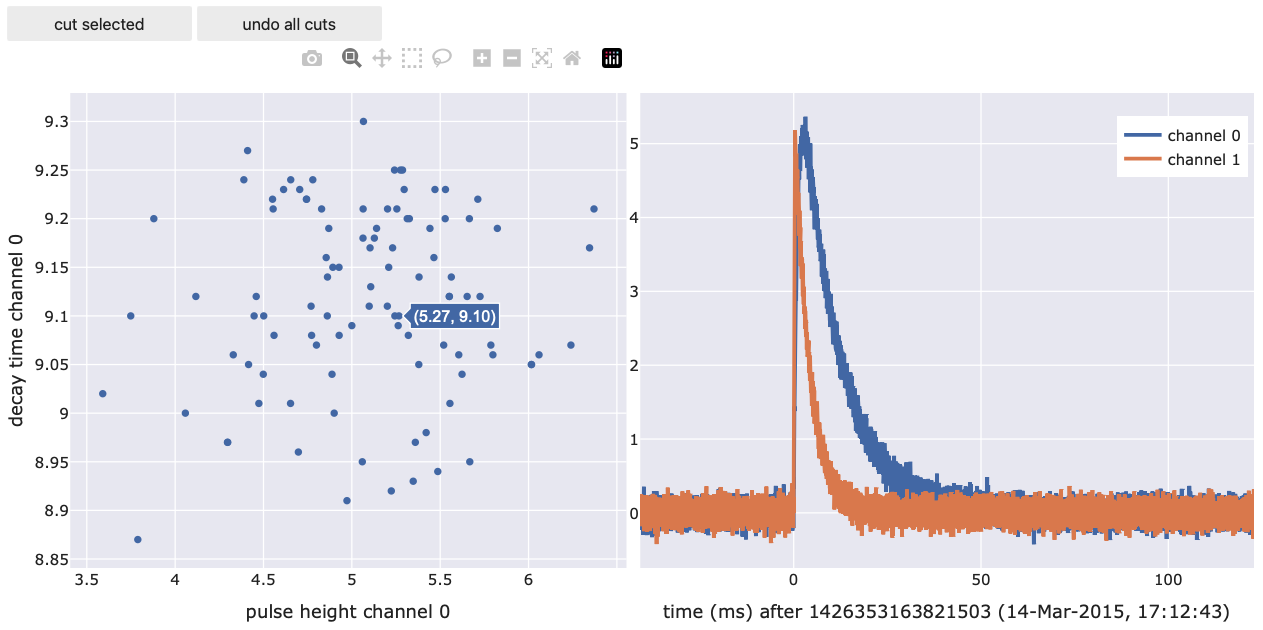
ScatterPreview: A scatter plot where you can click datapoints and preview the underlying voltage trace. Also allows selection and removal of datapoints (similar to
VizTool). This tool only works withbackend='plotly'because it requires data selection which is not supported by a general backend.
Example:
import cait.versatile as vai

# generate mock data and calculate main parameters
it = vai.MockData().get_event_iterator().with_processing(vai.RemoveBaseline())
pulse_height, onset, rise_time, decay_time, slope = vai.apply(vai.CalcMP(dt_us=it.dt_us), it)

# plot two main parameters and apply some formatting
# (assigning it to a variable is not necessary but allows for additional functionality)
prev = vai.ScatterPreview(x=pulse_height[:,0],
                       y=decay_time[:,0],
                       ev_it=it,
                       xlabel="pulse height channel 0",
                       ylabel="decay time channel 0",
                       width=500)
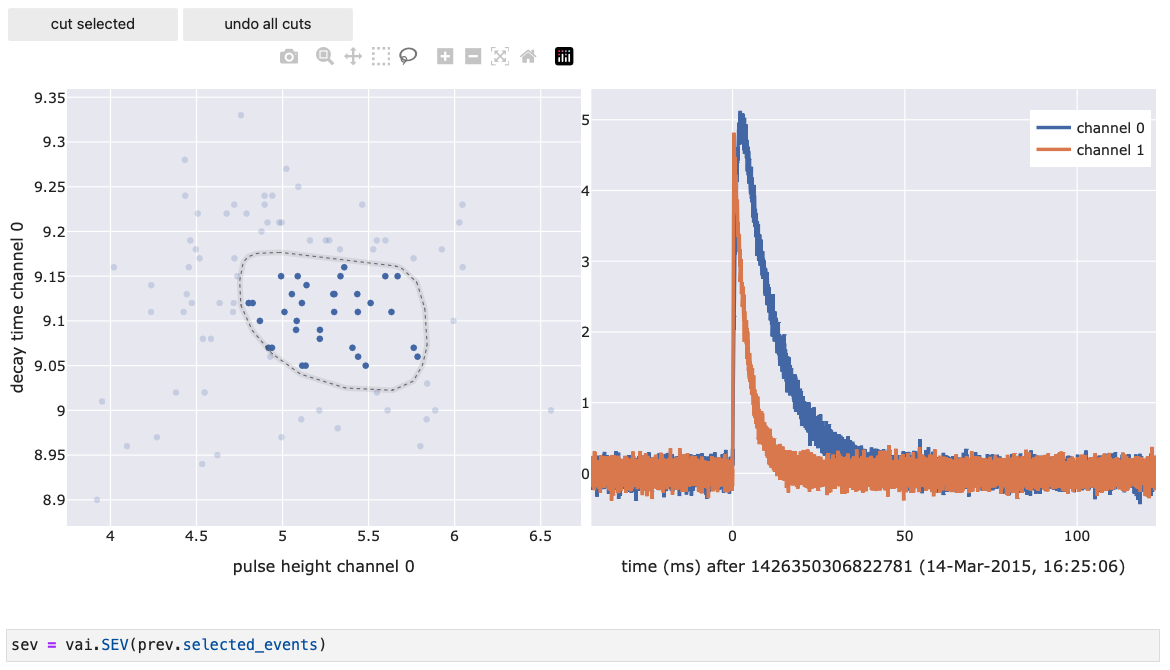
You can use the lasso tool to select a number of events. These events are then directly accessible through prev.selected_events (returns an EventIterator) and prev.selected_inds (returns the indices of the selected events). Using this, you can for example do things like this:
Documentation
- class cait.versatile.Histogram(data: Union[List[float], dict], bins: Optional[Union[tuple, int]] = None, **kwargs)[source]
Bases:
cait.versatile.plot.viewer.ViewerPlot a Histogram.
- Parameters
data (Union[List[float], dict]) – The data to bin and plot. You can either hand a list-like object (simple plotting of one histogram, or multiple histograms if multi-dimensional) or a dictionary whose keys are histogram names and whose values are again list-like objects (for each key a histogram is binned, plotted and a legend entry is created).
bins (Union[None, int, tuple], optional) – The binning data to use. If None, the binning is done automatically. An integer is interpreted as the desired total number of bins. You can also parse a tuple of the form (start, end, nbins) to bin the data between start and end into a total of nbins bins
kwargs (Any) – Keyword arguments for Viewer like ‘width’, ‘height’, ‘xrange’, ‘ylabel’.
Example:
import cait.versatile as vai

vai.Histogram([1,2,3])
vai.Histogram([[1,2,3], [5,6,7]])
vai.Histogram({"first hist": [1,2,3], "second hist": [0,1,2]})
vai.Histogram([1,2,3], bins=100, backend="mpl")
vai.Histogram([1,2,3], bins=(0,5,100), backend="mpl")
- class cait.versatile.Line(y: Union[List[float], List[List[float]], dict], x: Optional[List[float]] = None, **kwargs)[source]
Bases:
cait.versatile.plot.viewer.ViewerPlot a line graph.
- Parameters
y (Union[List[float], dict]) – The y-data to plot. You can either hand a list-like object (simple plotting of one line, or multiple lines if multi-dimensional) or a dictionary whose keys are line names and whose values are again list-like objects (for each key a line is plotted and a legend entry is created. If the values in the dictionary are lists, the first entry is interpreted as x-values and the second as y-values).
x (List[float], optional) – The x-data to plot (for any lines for which x-data was not explicitly specified, see above). If None is specified, the y-data is plotted over the data index. Defaults to None.
kwargs (Any) – Keyword arguments for Viewer like ‘width’, ‘height’, ‘xrange’, ‘ylabel’.
Example:
import cait.versatile as vai

vai.Line([1,2,3])
vai.Line([[1,2,3], [5,6,7]])
vai.Line({"first line": [1,2,3], "second line with x data": [[0,1,2],[3,4,5]]})
vai.Line([1,2,3], x=[1,2,3], xrange=(-1, 4), backend="mpl")
- class cait.versatile.Preview(events: cait.versatile.iterators.iteratorbase.IteratorBaseClass, f: Optional[Callable] = None, **kwargs)[source]
Bases:
cait.versatile.plot.viewer.ViewerClass for inspecting the behavior of functions which were subclassed from
abstract_functions.FncBaseClass. Can also be used to display single events if no function is specified.- Parameters
events (IteratorBaseClass) – An iterable of events. Can be e.g.
IteratorBaseClass, a 2dnumpy.ndarrayor a list of List[float].f (
abstract_functions.FncBaseClass) – The function to be inspected, already initialized with the values that should stay fixed throughout the inspection. Defaults to Unity (which means that just the events of the iterable will be displayed)kwargs (Any) – Keyword arguments for Viewer.
- class cait.versatile.Scatter(y: Union[List[float], dict], x: Optional[List[float]] = None, **kwargs)[source]
Bases:
cait.versatile.plot.viewer.ViewerPlot a scatter graph.
- Parameters
y (Union[List[float], dict]) – The y-data to plot. You can either hand a list-like object (simple plotting of one scatter, or multiple scatters if multi-dimensional) or a dictionary whose keys are line names and whose values are again list-like objects (for each key a scatter is plotted and a legend entry is created. If the values in the dictionary are lists, the first entry is interpreted as x-values and the second as y-values).
x (List[float], optional) – The x-data to plot (for any lines for which x-data was not explicitly specified, see above). If None is specified, the y-data is plotted over the data index. Defaults to None.
kwargs (Any) – Keyword arguments for Viewer like ‘width’, ‘height’, ‘xrange’, ‘ylabel’.
Example:
import cait.versatile as vai

vai.Scatter([1,2,3])
vai.Scatter([[1,2,3], [5,6,7]])
vai.Scatter({"first scatter": [1,2,3], "second scatter with x data": [[0,1,2],[3,4,5]]})
vai.Scatter([1,2,3], x=[1,2,3], xrange=(-1, 4), backend="mpl")
- class cait.versatile.ScatterPreview(x: List[float], y: List[float], ev_it: cait.versatile.iterators.iteratorbase.IteratorBaseClass, **kwargs)[source]
Bases:
objectScatter plot with event preview.
Clicking on scatter data displays the corresponding event in a separate figure. You can select scatter points and delete them from the plot using the “cut selected” button. The currently selected data indices and events are furthermore accessible through the respective methods.
- Parameters
x (List[float]) – x-data for the scatter plot.
y (List[float]) – y-data for the scatter plot.
ev_it (IteratorBaseClass) – Event iterator corresponding to the x-y data (if a point (x,y) is clicked, the corresponding event from the iterator is displayed).
kwargs (dict, optional) – Keyword arguments for the cait.versatile.Viewer class.
- property selected_events
Returs an iterator of events currently selected in the scatter plot.
- property selected_inds
Returns the indices (of the original x-y data) currently selected in the scatter plot.
- class cait.versatile.StreamViewer(*args: Union[cait.versatile.datasources.stream.streambase.StreamBaseClass, str, list], keys: Optional[Union[str, List[str]]] = None, n_points: int = 10000, downsample_factor: int = 100, mark_timestamps: Optional[Union[List[int], dict]] = None, of: Optional[numpy.ndarray] = None, **kwargs)[source]
Bases:
cait.versatile.plot.viewer.ViewerClass to view stream data, i.e. for example the contents of a binary file as produced by vdaq2.
- Parameters
args (Union[StreamBaseClass, str, list]) – Either an existing Stream instance or both ‘hardware’ (str) and file(s) (str or list of str).
keys (Union[str, List[str]]) – The keys of the stream to display. If none are specified, all available keys are plotted. Defaults to None.
n_points (int, optional) – The number of data points that should be simultaneously displayed in the stream viewer. A large number can impact performance. Note that the number of points that are displayed are irrelevant of the downsampling factor (see below), i.e. the viewer will always display n_points points.
downsample_factor (int, optional) – This many samples are skipped in the data when plotting it. A higher number increases performance but lowers the level of detail in the data.
mark_timestamps (Union[List[int], int], optional) – A list of timestamps to be shown on top of the stream (e.g. to check trigger timestamps). Can also be a dictionary of lists, in which case they keys of the dictionary are used as legend entries.
of (np.ndarray, optional) – If provided, a preview of the optimum filtered stream is shown. Only works for single-channel filters in which case also the ‘keys’ argument has to be set to exactly one channel (the one you want to filter).
kwargs (Any) – Keyword arguments for Viewer.
>>> s = Stream(hardware="vdaq2", src="path/to/file.bin")
>>> StreamViewer(s)
>>> StreamViewer("vdaq2", "path/to/file.bin", key="ADC1")
- class cait.versatile.Viewer(data=None, backend='auto', xlabel: Optional[str] = None, ylabel: Optional[str] = None, xscale: Optional[str] = None, yscale: Optional[str] = None, xrange: Optional[tuple] = None, yrange: Optional[tuple] = None, **kwargs)[source]
Bases:
objectClass for plotting data given a dictionary of instructions (see below). For convenience, the axis properties can alternatively be set as keyword arguments, too, and will override the axis properties contained in the dictionary.
- Parameters
data (dict, optional) – Data dictionary containing line/scatter/axes information (see below), defaults to None
backend (str, optional) – The backend to use for the plot. Either of [‘plotly’, ‘mpl’, ‘uniplot’, ‘auto’], i.e. plotly, matplotlib or uniplot (command line based), defaults to ‘auto’ which uses ‘plotly’ in notebooks and ‘uniplot’ otherwise.
xlabel (str, optional) – x-label for the plot.
ylabel (str, optional) – y-label for the plot.
xscale (str, optional) – x-scale for the plot. Either of [‘linear’, ‘log’], defaults to ‘linear’.
yscale (str, optional) – y-scale for the plot. Either of [‘linear’, ‘log’], defaults to ‘linear’.
xrange (tuple, optional) – x-range for the plot. A tuple of (xmin, xmax), defaults to None, i.e. auto-scaling.
yrange (tuple, optional) – y-range for the plot. A tuple of (ymin, ymax), defaults to None, i.e. auto-scaling.
template (str, optional) – Valid backend theme. For plotly either of [‘ggplot2’, ‘seaborn’, ‘simple_white’, ‘plotly’, ‘plotly_white’, ‘plotly_dark’, ‘presentation’, ‘xgridoff’, ‘ygridoff’, ‘gridon’, ‘none’], for mpl either of [‘default’, ‘classic’, ‘Solarize_Light2’, ‘_classic_test_patch’, ‘_mpl-gallery’, ‘_mpl-gallery-nogrid’, ‘bmh’, ‘classic’, ‘dark_background’, ‘fast’, ‘fivethirtyeight’, ‘ggplot’, ‘grayscale’, ‘seaborn-v0_8’, ‘seaborn-v0_8-bright’, ‘seaborn-v0_8-colorblind’, ‘seaborn-v0_8-dark’, ‘seaborn-v0_8-dark-palette’, ‘seaborn-v0_8-darkgrid’, ‘seaborn-v0_8-deep’, ‘seaborn-v0_8-muted’, ‘seaborn-v0_8-notebook’, ‘seaborn-v0_8-paper’, ‘seaborn-v0_8-pastel’, ‘seaborn-v0_8-poster’, ‘seaborn-v0_8-talk’, ‘seaborn-v0_8-ticks’, ‘seaborn-v0_8-white’, ‘seaborn-v0_8-whitegrid’, ‘tableau-colorblind10’], defaults to ‘ggplot2’ for backend=plotly and to ‘seaborn’ for backend=mpl. template has no effect for backend ‘uniplot’.
height (int, optional) – Figure height, defaults to 500 for backend=plotly, 3 for backend=mpl and 17 for backend=uniplot
width (int, optional) – Figure width, defaults to 700 for backend=plotly, 5 for backend=mpl and 60 for backend=uniplot
show_controls (bool) – Show button controls to interact with the figure. The available buttons depend on the plotting backend. Defaults to False
Convention for ‘data’ Dictionary:
data = {
        "line": {
            "line1": [x_data1, y_data1],
            "line2": [x_data2, y_data2]
            },
        "scatter": {
            "scatter1": [x_data1, y_data1],
            "scatter2": [x_data2, y_data2]
            },
        "histogram": {
            "hist1": [bin_data1, hist_data1],
            "hist2": [bin_data2, hist_data2]
            },
        "axes": {
            "xaxis": {
                "label": "xlabel",
                "scale": "linear",
                "range": (0, 10)
                },
            "yaxis": {
                "label": "ylabel",
                "scale": "log",
                "range": (0, 10)
                }
            }
        }
- add_histogram(bins: Union[int, tuple], data: List[float], name: Optional[str] = None)[source]
Add a histogram to the figure. If a name is provided, it is registered and can later be updated.
- Parameters
bins (Union[None, int, tuple], optional) – The binning data to use. If None, the binning is done automatically. An integer is interpreted as the desired total number of bins. You can also parse a tuple of the form (start, end, nbins) to bin the data between start and end into a total of nbins bins
data (List[float]) – The data to bin.
name (str, optional) – The name of the histogram in the legend and its unique identifier for later updates. If None, the histogram does not show up in the legend and is not registered for later update.
- add_line(x: List[float], y: List[float], name: Optional[str] = None)[source]
Add a line plot to the figure. If a name is provided, it is registered and can later be updated.
- Parameters
x (List[float]) – The x-data of the line.
y (List[float]) – The y-data of the line.
name (str, optional) – The name of the line in the legend and its unique identifier for later updates. If None, the line does not show up in the legend and is not registered for later update.
- add_scatter(x: List[float], y: List[float], name: Optional[str] = None)[source]
Add a scatter plot to the figure. If a name is provided, it is registered and can later be updated.
- Parameters
x (List[float]) – The x-data of the scatter.
y (List[float]) – The y-data of the scatter.
name (str, optional) – The name of the scatter in the legend and its unique identifier for later updates. If None, the scatter does not show up in the legend and is not registered for later update.
- add_vmarker(marker_pos: Union[float, List[float]], y_int: Tuple[float], name: Optional[str] = None)[source]
- get_figure()[source]
Returns the figure object of the plot. Can be used to further manipulate the plot.
- plot(data: dict)[source]
Plot data stored in dictionary.
- Parameters
data (dict) – The data dictionary to plot (see
Viewerfor details on how the dictionary needs to be structured)
- set_xrange(xrange: tuple)[source]
Set the x-range of the figure.
- Parameters
xrange (tuple) – x-range. A tuple of (xmin, xmax)
- set_xscale(xscale: str)[source]
Set the x-scale of the figure. Either linear or logarithmic.
- Parameters
xscale (str) – x-scale. Either of [“linear”, “log”]
- set_yrange(yrange: tuple)[source]
Set the y-range of the figure.
- Parameters
yrange (tuple) – y-range. A tuple of (ymin, ymax)
- set_yscale(yscale: str)[source]
Set the y-scale of the figure. Either linear or logarithmic.
- Parameters
yscale (str) – y-scale. Either of [“linear”, “log”]
- show_legend(show: bool = True)[source]
Show/hide legend.
- Parameters
show (bool) – If True, legend is shown. If False, legend is hidden.
- update_histogram(name: str, bins: Union[int, tuple], data: List[float])[source]
Update the histogram called name with data data and bins bins. See func:add_histogram for an explanation of the arguments.
- update_line(name: str, x: List[float], y: List[float])[source]
Update the line called name with data x and y. See func:add_line for an explanation of the arguments.