cait.EventInterface
-
class
cait.EventInterface(record_length: int = 16384, sample_frequency: int = 25000, nmbr_channels: int = 2, down: int = 1, dpi: int = None, run: str = None, module: str = None, pre_trigger_region: float = 0.125)[source]¶ Bases:
objectA class for the viewing and labeling of Events from HDF5 data sets.
The Event interface is one of the core classes of the cait package. It is used to view raw data events and label them in order to train supervised machine learning models. The interface is with an interactive menu optimized for an efficient workflow.
- Parameters
record_length (int) – The number of samples in a record window.
sample_frequency (int) – The record frequency of the measurement.
nmbr_channels (int) – The number of channels of the detector modules, typically 1, 2 (phonon/light) or 3 (including I-sticks or ring).
down (int) – The downsample rate for viewing the events. This can later be adapted in the interactive menu.
dpi (int) – Dots per inch for the plots.
run (string or None) – The number of the measurement run. This is a optional argument, to identify a measurement with a given module uniquely. Providing this argument has no effect, but might be useful in case you start multiple DataHandlers at once, to stay organized.
module (string or None) – The naming of the detector module. Optional argument, for unique identification of the physics data. Providing this argument has no effect, but might be useful in case you start multiple DataHandlers at once, to stay organized.
>>> ei = ai.EventInterface()
Event Interface Instance created.
>>> ei.load_h5(path='./', fname='test_001', channels=[0,1])
Nmbr triggered events: 4
Nmbr testpulses:  11
Nmbr noise:  4
HDF5 File loaded.
>>> ei.create_labels_csv(path='./')
-
create_labels_csv(path: str)[source]¶ Create a new CSV file to store the labels.
The labels are intentionally not included in the HDF5 set right away, to provide a fail-save mechanism in case the HDF5 file is re-converted or the this method is accidentally called, overwriting existing labels. Labels are usually assigned per hand, making the labels the most time-costly values in your dataset.
- Parameters
path (string) – The path to the file folder where the labels CSV is to be created. A unique naming is automatically assigned, e.g. “data/” –> file name “data/labels_bck_001_type.csv”.
-
export_labels(path: str, type: str = 'events')[source]¶ Save the labels included in the HDF5 file as CSV file.
You will usually need this option if you have an HDF5 file with included labels, but lost the corresponding CSV file. Also, it is recommended to export and store the labels as CSV in on a safe place, e.g. in a Wiki.
- Parameters
path (string) – The path to the file folder containing the labels CSV, e.g. “data/” –> file name “data/labels_bck_001_type.csv”.
type (string) – The group in the HDF5 file corresponding to the labels, either ‘events’, ‘testpulses’ or ‘noise’.
>>> ei.export_labels(path='./')
Labels from HDF5 exported to ./labels_test_001_.
-
export_predictions(path: str, model: str, type: str = 'events')[source]¶ Save the predictions from a machine learning model included in the HDF5 file as CSV file.
- Parameters
path (string) – The path to the file folder containing the predictions CSV, e.g. “data/” –> file name “data/<model>_predictions_bck_001_type.csv”.
type (string) – The name of the group in the HDF5 file, either ‘events’ or ‘testpulses’ or ‘noise’.
model (string) – The name of the model that made the predictions, e.g. “RF” –> Random Forest.
>>> ei.export_predictions(path='./', model='RF')
RF Predictions from HDF5 exported to RF_predictions_test_001_events.
-
load_h5(path: str, fname: str, channels: list = None, appendix=True, which_to_label=['events'])[source]¶ Load a hdf5 dataset to the event interface instance. This is typically done right after the declaration of a new instance.
- Parameters
path (string) – Path to the file folder. E.g. “data/” –> filepath “data/fname-[appendix].h5”.
channels (list of string) – The numbers of the channels that are included in the HDF5 file. The should be consistent with the appendix of the file name. If the file has no appendix, the numbering can be done arbitrarily, e.g. with [0, 1] for a two-channel detector module.
fname (string) – The file name without suffix, e.g. “test_001.h5” –> “test_001”.
appendix (bool) – If True the appendix generated from the gen_h5_from_rdt function is automatically appended to the fname string. Use this argument, if your HDF5 file has such an appendix. Do not put the appendix in the fname string then, e.g. “test_001-P_Ch1-L_Ch2.h5” –> fname=”test_001”, appendix=True
which_to_label (list of strings) – Specify which groups from the HDF5 set should be labeled. Possible list members are ‘events’, ‘testpulses’ and ‘noise’. In most use cases you will just want the standard argument [‘events’].
-
load_labels_csv(path: str, type: str = 'events')[source]¶ Load a CSV file with labels for the given detector module.
- Parameters
path (string) – the path to the file folder containing the labels CSV file, e.g. “data/” –> file name “data/labels_bck_001_type.csv”.
type (string) – The group in the HDF5 corresponding to the labels, either ‘events’, ‘testpulses’ or ‘noise’.
>>> ei.load_labels_csv(path='./')
Loading Labels from ./labels_test_001_events.csv.
-
load_of(down: int = 1, group_name_appendix: str = '')[source]¶ Add the optimal transfer function from the HDF5 file.
- Parameters
down (int) – The downsample factor of the optimal transfer function. The data set of the optimumfilter in the HDF5 set has a consistent name appendix _downX.
group_name_appendix (str) – A string that is appended to the group name optimumfilter in the HDF5 file. Typically this could be _tp for a test pulse optimum filter.
This is needed in order to view the filtered event in the labeling or viewing process. For this to work, the optimal transfer function must be included in the HDF5 file, e.g. calculated with an instance of the DataHandler before (dh.calc_of()).
>>> ei.load_of()
Added the optimal transfer function.
-
load_predictions_csv(path: str, model: str, type: str = 'events')[source]¶ Load a CSV file with predictions from a machine learning model for the given HDF5 dataset.
- Parameters
path (string) – The path to the file folder containing the CSV file with the predictions, e.g. “data/” –> file name “data/<model>_predictions_bck_001_type.csv”.
type (string) – The group in the HDF5 file corresponding to the predictions, either ‘events’, ‘testpulses’ or ‘noise’.
model (string) – The name of the model that made the predictions, e.g. “RF” –> Random Forest.
>>> ei.load_predictions_csv(path='./', model='RF')
Loading Predictions from ./RF_predictions_test_001_events.csv.
-
load_saturation_par()[source]¶ Add the saturation fit parameters from the HDF5 file.
This is needed to show the saturated, fitted events.
-
load_sev_par(name_appendix='', sample_length=0.04, group_name_appendix: str = '')[source]¶ Add the sev fit parameters from the HDF5 file.
This is needed in order to view the fitted event in the labeling or viewing process. For this to work, the sev fit parameters for every event must be included in the HDF5 file, e.g. calculated with an instance of the DataHandler before (dh.apply_sev_fit()).
- Parameters
name_appendix (string) – An appendix to the data set sev_fit_par in the HDF5 set. Typically this is _downX in case a downsampling was used for the fit.
sample_length (float) – The length of a sample in milliseconds, i.e. 1/sample_frequency.
group_name_appendix (string) – A string that is appended to the group name stdevent in the HDF5 file. Typically this could be _tp for a test pulse standard event.
>>> ei.load_sev_par()
Added the sev fit parameters.
-
set_threshold(threshold: list)[source]¶ Set a threshold to show for all channels.
- Parameters
thresholds (list of floats) – The thresholds for all channels.
-
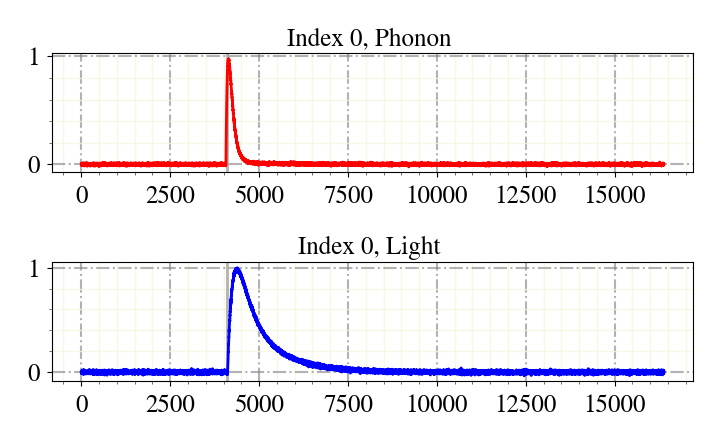
show(idx: int, type: str = 'events')[source]¶ Plots an event of the dataset.
- Parameters
idx (int) – The index of the event that is to show in the hdf5 file.
type (string) – The containing group in the HDF5 data set, either ‘events’, ‘testpulses’ or ‘noise’.
>>> ei.show(idx=0)
Label Phonon: 0.0
Label Light: 0.0
-
start(start_from_idx: int = 0, print_label_list: bool = True, label_only_class: int = None, label_only_prediction: int = None, model: str = None, viewer_mode: bool = False)[source]¶ Starts the label/view interface.
The user gets the events shown and is asked for labels. There are viewer options available:
n … next sample
b … previous sample
idx … user is asked for an index to jump to
q … quit
o … show set options and ask for changes, options are down - der - mp - predRF - predLSTM - triang - of - … - q
The options in the options menu change the displayed event:
down … Event is downsampled before plotting, this smoothes the noise.
der … The derivative of the event is shown.
mp … The main parameters are visualized as scatter points in the plot.
triang … A triangulation of the event is shown. This feature is experimental and not supported any longer.
of … The filtered event is shown.
q … Quit the menu and go back to the labeling interface.
There are more options, explore them in the options menu!
- Parameters
start_from_idx (int) – An event index to start labeling from.
print_label_list (bool) – If set to true, the list of the labels is printed together when the user is asked for labels.
label_only_class (int) – If set only events of this class will be shown in the labeling/viewing process.
label_only_prediction (int) – If set only events of this prediction will be shown in the labeling/viewing process.
model (string) – The naming of the model that made the predictions, e.g. ‘RF’ for Random Forest
viewer_mode (bool) – Activates viewer mode. Labelling is not possible while in viewer mode.